Transactions & Blocks
The transaction page
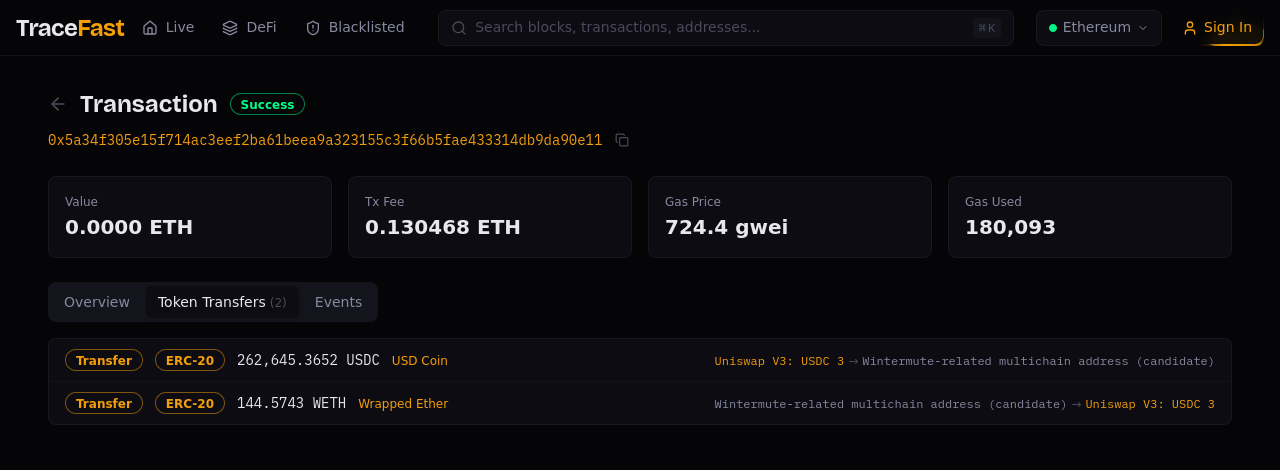
A transaction page leads with the verdict — Success or failure — and four cost KPIs: value moved, total fee, gas price, and gas used. Three tabs unpack what happened:
- Overview — sender, recipient, block, position, and raw parameters.
- Token Transfers — every token movement the transaction caused, with amounts, symbols, and labeled endpoints. In the example above, one glance shows the full story of a swap: USDC out, WETH back, through a labeled market-maker address.
- Events — the raw log entries for when you need exact contract-level truth.
:::tip Traces and transfers are two halves of one picture The call trace (in the transaction drawer) shows how a transaction did what it did — the tree of contract calls. Token Transfers shows what it accomplished — the assets that actually moved. Reading them together is the fastest way to understand a complex transaction: trace for mechanics, transfers for meaning. :::
Deep links work everywhere: ?tab=token-transfers opens the tab directly, and ?tx=0x… on the dashboard opens the drawer — both URLs are shareable.
The block page
A block page shows the block's production context (builder, parent, timestamp) and tabs for its transactions, token transfers, and addresses touched. Prev/next navigation steps through the chain block by block.
Related pages
- Transaction Economics — the drawer: gas & fee decomposition + trace
- Block KPIs — blocks as they land
- Addresses & Labels — follow any participant