Addresses & Labels
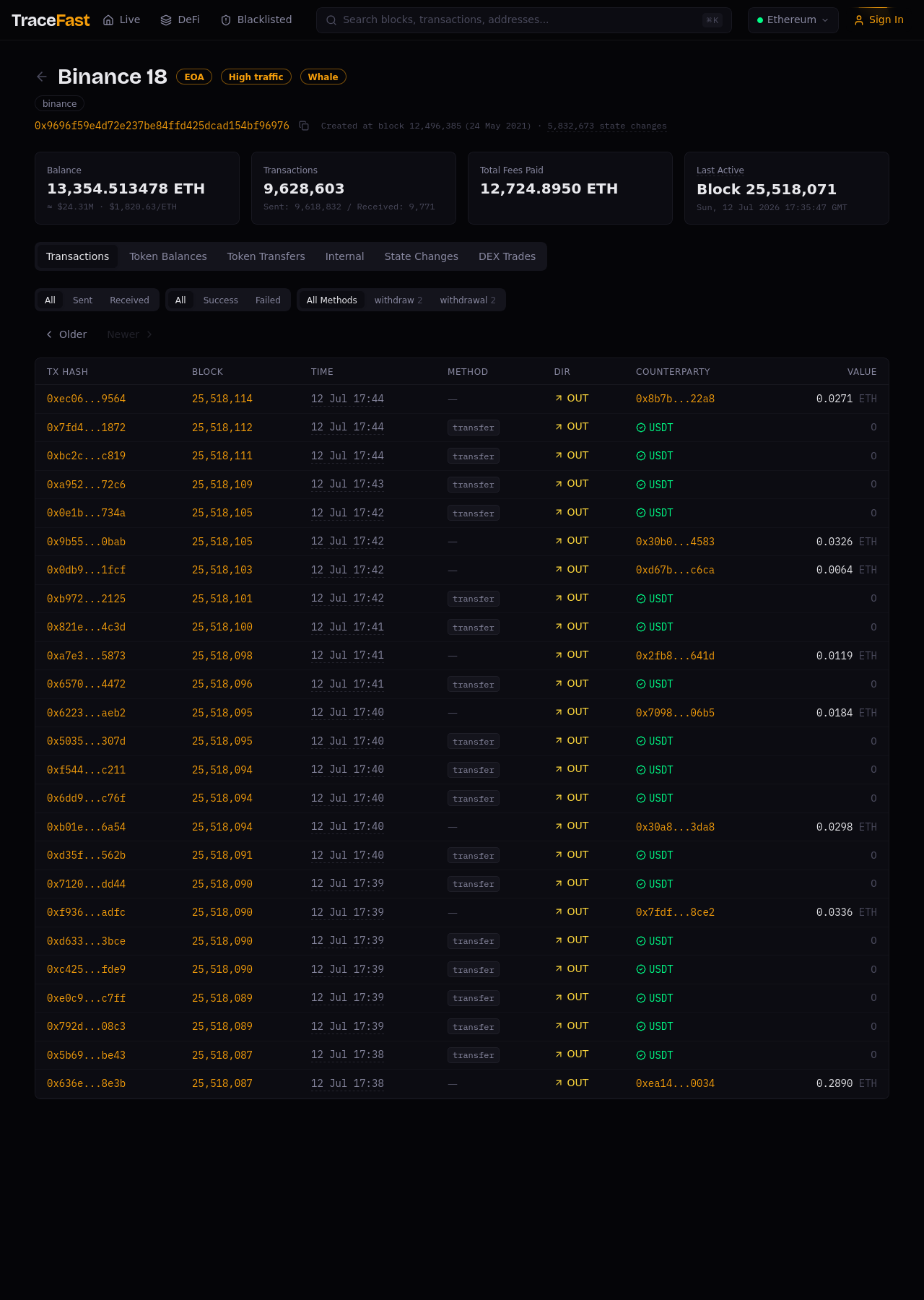
The address page
Search for any address (⌘K) or click one anywhere in the app. The page opens with identity first:
- Name and badges — a labeled address shows its name (Binance 18) and classification badges:
EOAor contract, plus behavioral tags likeHigh trafficorWhale. - Entity — the organization the address belongs to (binance). One entity typically spans many addresses; see Labels & Entities.
- KPIs — current balance (ETH and USD), lifetime transaction count (sent/received), total fees paid, and the block where it was last active.
Activity tabs
- Transactions — full history with direction, method, counterparty (labeled), and value. Filter by direction, status, and method.
- Token Balances / Token Transfers — what it holds and what it moves.
- Internal — value moved by contract calls rather than top-level transactions.
- State Changes — how the address's state evolved block by block.
- DEX Trades — its swap history.
Every counterparty is a link, so tracing a flow is a chain of clicks, not a chain of copy-pastes.
Blacklisted addresses
The Blacklisted section in the top navigation tracks addresses flagged by risk intelligence. If an address you're viewing carries a warning badge, treat its counterparties with corresponding suspicion.
Related pages
- Labels & Entities — how names and badges are assigned
- ETH Flows — labeled addresses in live motion
- Smart Contracts — when the address is a contract