Transactions
Open the transaction explorer in TraceFast →
The transaction list
A live list of transactions as they land, one row each: hash, method, block, timestamp (UTC), sender and recipient (labeled where known, for signed-in viewers), native value, the token moved (with +N when more than one moved), and the fee paid. Filters narrow it by status (success / failed) and by method — transfer, transferFrom, approve, swap, deposit, withdraw, execute, multicall — and page size is adjustable.
Every hash, address and block number in the table is a link, so the list is a jumping-off point rather than a destination.
The transaction page
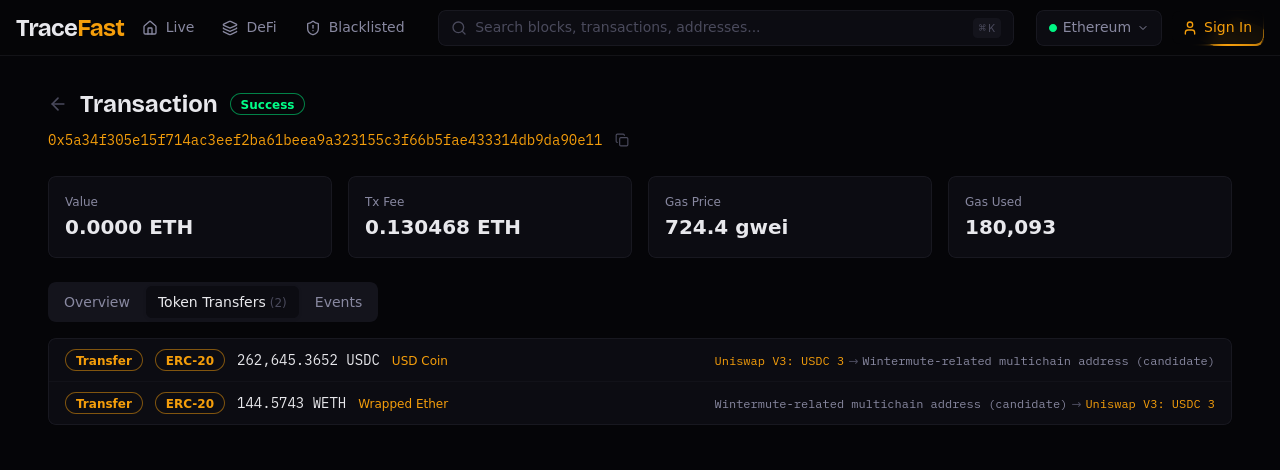
A transaction page leads with the verdict — Success or failure — the block,
how long ago it landed, and behaviour chips where they apply (delegatecall,
SELFDESTRUCT, Storage-heavy). Beside the hash, Tx N of M in block steps
through the block's transactions in order.
Under the KPIs sits one plain sentence saying what the transaction did — "A token transfer: USDC" — so the tabs answer questions you already have.
Four KPIs:
- Value — native ETH moved by the top-level call, with its USD value.
- Token Transfers — how many token movements the transaction produced.
- Tx Type — Legacy, EIP-1559, EIP-4844 (blob) or EIP-7702, with a note on what the format implies for fees.
- Method — the function called, resolved from its 4-byte selector. A bare
0x…selector means the signature isn't in the set TraceFast resolves against — not that the call did nothing.
Behavioural pills appear next to the header when they apply — for example SELFDESTRUCT or Storage-heavy.
Tabs
Each tab label carries its count.
- Overview — block and position, sender, recipient, nonce; a Gas & fees block with gas used against the limit, the effective gas price actually paid, the max fee and max priority fee the sender authorised, and the total fee split into the burnt share, the part paid to the validator, and what was left under the cap; an Execution summary — internal (value-carrying) transfers, committed storage writes and slots written, contracts touched, and maximum call depth; and Opcode counts (below).
- Token Transfers — every fungible movement the transaction caused, with amounts, symbols and labeled endpoints, under a Net flow panel (below). One glance shows the full story of a swap: USDC out, WETH back, through a labeled market maker.
- NFT Transfers — ERC-721 and ERC-1155 movements, kept apart because a token id is not an amount.
- Events — the raw log entries, decoded where the ABI is known, for when you need exact contract-level truth.
- State — what the transaction changed: accounts, storage, transient storage, and its dependencies on other transactions in the block (below).
- Trace — the full call tree.
Signed in, a star on a transfer, an event, a token or a call in the tree saves it to your Favorites.
Opcode counts
A panel of its own beside Execution, because it counts something different:
Execution reports what was committed, while opcode counts include frames that
later reverted. It shows SLOAD, SSTORE, TLOAD, TSTORE and KECCAK256
counts, precompile calls, how many contracts' storage was used, creates and
self-destructs, the gas spent in reverted frames, and whether any
DELEGATECALL ran.
Net flow
What each address ended up with over the whole transaction: tokens from the transfers on the tab, and ETH from the address's balance change — so ETH that a swap paid out through an unwrap is counted. The sender's ETH figure includes gas. A USD net is shown when every leg has a price for the transaction's hour. If the ETH side cannot be read, the panel says so rather than showing zero.
Trace

The trace answers how the transaction did what it did:
- Gas hotspots — which frames burnt the gas, as a share of the total, so an expensive transaction points at its own cause.
- Repeated calls — the same call to the same contract made more than once.
- Participants — how many contracts were called and how many ran through
DELEGATECALL, with the repeat count per address. - The tree — every frame with its call type, caller and callee (labeled), the selector, the logs it emitted, and its depth; expand and collapse all, or jump to a depth.
- The frame panel — for the selected call: the sender, the contract whose state was used and the contract whose code ran (the pair that makes a proxy call readable), gas used against the frame's limit, the selector, and the logs and transfers that frame caused, and its input. Long calldata shows its first bytes and says so; arguments are not decoded from a partial payload. Where calldata is unavailable, the panel says so instead of showing an empty box.
?frame= selects a call by its position in the tree: the tree expands to it
and scrolls it into view. If the position is not in the trace shown — for
example, past the end of a long trace that was cut — the page says that rather
than guessing.
State

The tab has four sections:
- Accounts — every account the transaction changed: balance before and after, the change, nonce, and badges for code and storage (for example, an account that did not exist before). Some changes are never in this list: block-level movements such as validator withdrawals, a fee recipient that received only the priority fee, and an account created and destroyed in the same transaction.
- Storage writes — every write to contract storage, grouped per contract:
the slot, the value before and after, the frame type and the address whose
code wrote it. Where the slot's layout is known, it is named as a variable —
slot 3, orslot 5 [0xa0b8…]for a mapping entry and its key — instead of a raw hash; otherwise the raw slot stands with a note. - Transient storage — writes to transient storage (EIP-1153): values that live only until the transaction ends, such as re-entrancy locks. Only writes from frames that did not revert are listed.
- Dependencies in this block — the earlier transactions whose writes this one read, and the later ones that read what it wrote, with the number of slots and contracts. See Blocks → Dependencies.
A "before" value is shown only where it is stated. Otherwise the cell is a dash, and its tooltip gives the reason — never a zero, which would be a real slot value.
:::tip Trace and transfers are two halves of one picture Trace shows how a transaction did what it did — the tree of contract calls. Token Transfers shows what it accomplished — the assets that actually moved. Reading them together is the fastest way to understand a complex transaction: trace for mechanics, transfers for meaning.
The same call tree is also reachable from the transaction drawer on the live dashboard, for a transaction you spotted in the stream. :::
:::info Gas Price vs Max Fee Per Gas Gas Price is what was charged — base fee plus priority tip. Max Fee Per Gas is only the ceiling the sender authorised. On a quiet network the two diverge sharply, and the difference is not a saving the sender chose, it is a bid that was never met. :::
Deep links
Both the tab and the page position live in the URL, so any view is shareable:
https://tracefast.xyz/tx/0x…?tab=token-transfers— opens straight to transfershttps://tracefast.xyz/tx/0x…?tab=nft-transfers— the NFT movementshttps://tracefast.xyz/tx/0x…?tab=events— opens straight to the logshttps://tracefast.xyz/tx/0x…?tab=state— the storage writeshttps://tracefast.xyz/tx/0x…?tab=trace— the call treehttps://tracefast.xyz/tx/0x…?log=5— one event, by its position in the transaction: the page opens the tab and page that show it, and highlights ithttps://tracefast.xyz/tx/0x…?tab=trace&frame=…— one call in the treehttps://tracefast.xyz/?tx=0x…— opens the transaction drawer on the live dashboard
Related pages
- Transaction Economics — the drawer: gas & fee decomposition plus the call trace
- Blocks — the block that carried the transaction
- Failed Transactions — where gas is being burnt on reverts
- Entity Page — follow any participant
Last updated 22 Oct 2026, 08:06 UTC · verified against TraceFast v1.0.261 · Markdown